Eevee Isn't a Compromise — It's a Weapon: How to Know When to Ditch Cycles for Your Final Render
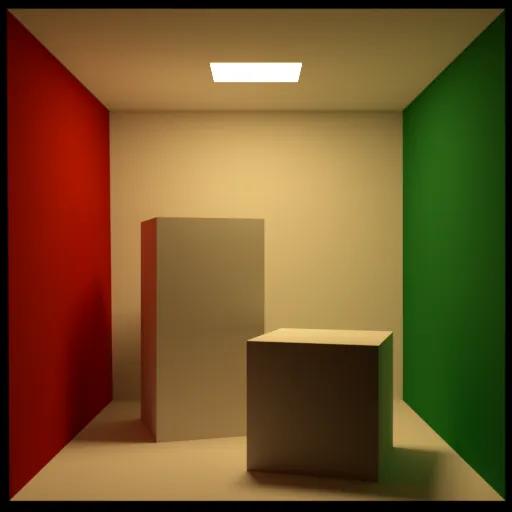
Photo: Czerniawskimc, CC0, via Wikimedia Commons
Somewhere along the way, the Blender community developed a quiet hierarchy: Cycles is for serious work, Eevee is for previews. You do your real rendering in Cycles and use Eevee when you're too impatient to wait for samples to converge. Say that out loud to a veteran Blender artist and they'll probably nod along like it's gospel.
Except it's not true — and if you're defaulting to Cycles for every project without thinking critically about what you actually need, you're leaving a ton of efficiency on the table.
This isn't a defense of cutting corners. It's an argument for using the right tool for the job. Let's get into it.
The Assumption Nobody Questions
Cycles is a path tracer. It simulates how light actually bounces around a scene — off surfaces, through volumes, between objects. Given enough samples and time, it produces physically accurate results that are genuinely hard to argue with. That reputation is earned.
Eevee is a rasterization engine. It uses screen-space techniques, shadow maps, and approximations to fake a lot of what Cycles calculates for real. The word 'fake' makes artists nervous, and understandably so.
But here's the thing: your audience doesn't care how the light was calculated. They care what the image looks like. And in a surprising number of real-world project types, Eevee produces results that are — at minimum — indistinguishable from Cycles at delivery resolution, and sometimes outright better suited to the aesthetic the client actually wants.
Where Eevee Genuinely Wins
Stylized and Non-Photorealistic Projects
If your project involves toon shading, flat color illustration, cel animation, or any kind of stylized look, Cycles is working against you from the start. Path tracing is built around physical plausibility, and stylized work is explicitly trying to escape physical plausibility. You spend half your time fighting the engine to stop it from doing what it's designed to do.
Eevee, on the other hand, plays nicely with emission materials, bloom, custom shader graphs, and the kind of high-contrast, clean-shadow aesthetics that stylized work demands. Motion graphics studios and indie game cinematic teams have been quietly shipping Eevee-rendered content for years. It shows up in product explainer videos, YouTube intros, and short-form social content constantly — and nobody watching those videos is filing a complaint about render engine choice.
Architecture and Product Visualization with Controlled Lighting
This one surprises people. Arch-viz has a reputation as a Cycles stronghold, and for exterior daylight renders with complex indirect lighting, that's fair. But interior product shots and architectural detail renders — the kind where you control every light source, use area lights with defined shapes, and aren't relying on bounced exterior light to fill the scene — are absolutely viable in Eevee with proper setup.
The key is scene control. Eevee's screen-space ambient occlusion, reflection probes, and irradiance volumes exist specifically to approximate the global illumination that Cycles calculates from scratch. When you understand how those systems work and build your scene around them, you can get results that read as photorealistic at 1080p or even 4K output. Render time drops from hours to minutes.
Animation at Scale
This is where the math gets brutal. Say you're rendering a 90-second animation at 24fps — that's 2,160 frames. If a Cycles render at your quality target takes 8 minutes per frame, you're looking at 288 hours of render time. Eevee at 30 seconds per frame? That's 18 hours. That difference is not academic. For studios working on tight deadlines or artists rendering locally without a farm, Eevee can be the difference between shipping and not shipping.
The quality tradeoff at animation frame rates, viewed in motion, is dramatically smaller than it looks in side-by-side still comparisons. Motion blur, depth of field, and the viewer's eye all work in your favor.
Where Cycles Still Owns the Room
None of this means Eevee is universally superior. It absolutely isn't. There are project types where Cycles is the correct answer and there's no real debate.
Complex caustics and refractive materials — glass, liquid, gemstones — require actual light path simulation to look right. Eevee's screen-space reflections and refraction approximations fall apart quickly when a material needs to genuinely interact with its environment through transmission.
Volumetric lighting in detailed scenes — fog, smoke, fire, subsurface scattering in organic materials like skin — benefit enormously from Cycles' ability to trace light through participating media. Eevee has volumetric support, but it's coarser and less physically convincing in complex setups.
High-end still photography and product renders for print — when a client is paying for photorealism and the image will be scrutinized at large format, Cycles is the safer bet. The margin of error shrinks when someone is staring at a 24-inch poster.
A Practical Decision Framework
Instead of defaulting, run your next project through these questions before you commit to an engine:
1. Is the look stylized or photorealistic? Stylized leans Eevee. Photorealistic depends on the next questions.
2. How controlled is your lighting setup? Fully studio-controlled with defined light sources? Eevee can handle it. Relying on complex indirect bounce from environment HDRs? Cycles earns its keep.
3. Are you rendering animation or stills? Animation at scale almost always favors Eevee unless the shot absolutely requires Cycles-only features.
4. What are the delivery specs? Web and social content viewed at 1080p or less? Eevee's quality ceiling is more than sufficient. Print or large-format display? Push toward Cycles.
5. What's your deadline? This sounds crass, but it's real. A delivered render in Eevee beats a missed deadline waiting for Cycles samples.
The Setup Work Eevee Requires
Here's where a lot of artists go wrong: they drop a scene into Eevee, hit render, get muddy results, and conclude Eevee isn't good enough. Eevee isn't a magic button — it requires scene-specific setup to look its best.
You need to place irradiance volume probes strategically to capture indirect light in interior spaces. Reflection cubemap probes need to cover your reflective surfaces. Shadow cascade settings need adjustment based on scene scale. Ambient occlusion distance needs tuning for your specific geometry density.
Cycles forgives lazy lighting setups because it calculates everything from physics. Eevee rewards intentional setup. Once you understand what it needs, the engine is remarkably capable — but it doesn't do the work for you.
Stop Letting Render Engine Choice Be an Ego Decision
The Cycles-as-default mindset is partly practical and partly cultural. Path tracing is the technically rigorous choice, and there's a certain professional identity wrapped up in using it. But professional work is defined by output quality and delivery reliability, not by which algorithm generated your pixels.
Eevee in Blender 4.x is a genuinely mature engine. It's not a preview tool wearing a tuxedo. For the right project — stylized work, animation at scale, controlled lighting scenarios, tight deadlines — it's the most efficient path to a finished render you can be proud of.
Know what your project actually needs. Choose accordingly. That's the whole framework.